Pathstitch Logo
Pathstitch
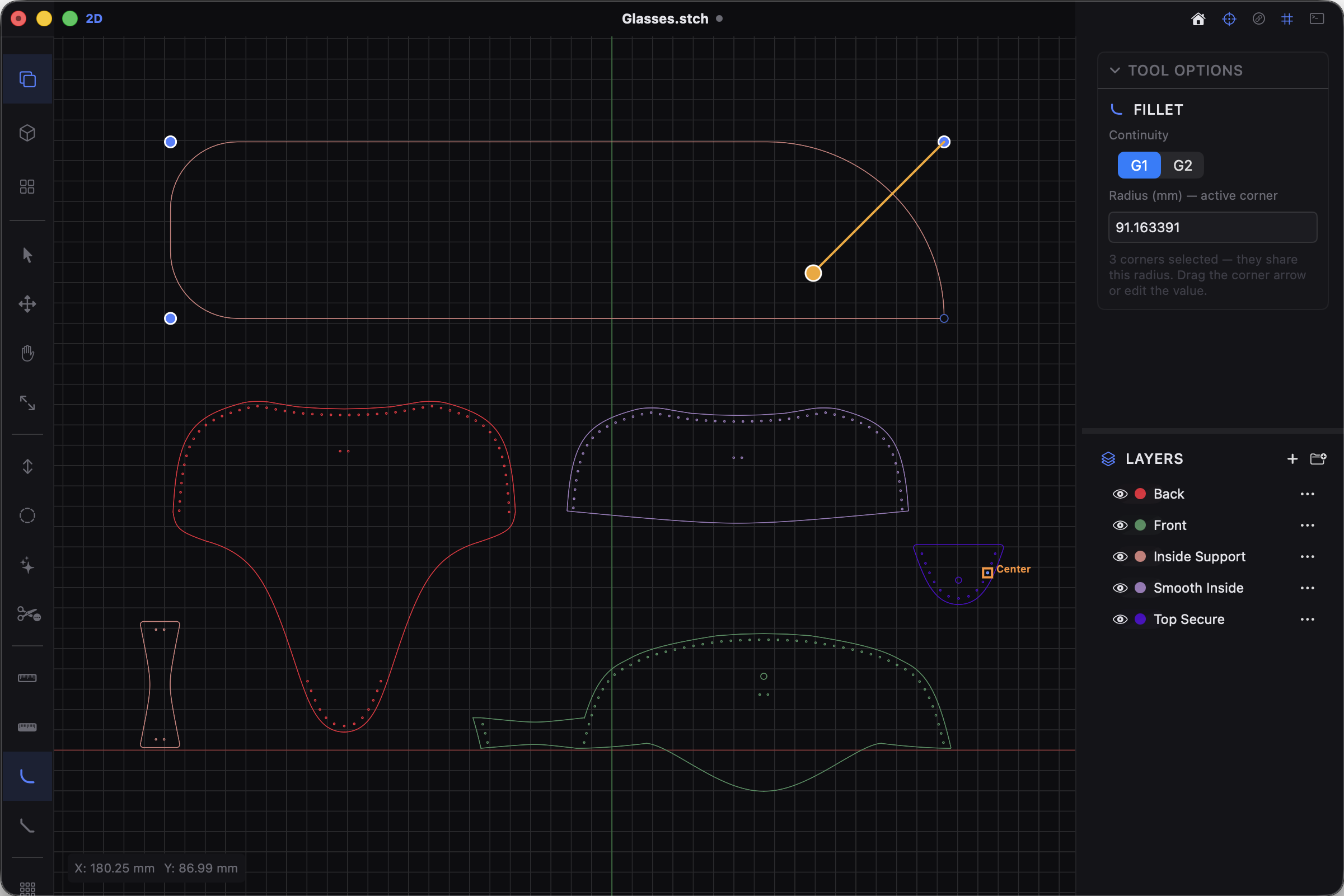
Pathstitch Screen

A fast, native Mac studio for leather patterns, saddle-stitch holes, and unfolding 3D models into flat, cuttable panels.

Free  ·  Open-source  ·  Native macOS

It started with a hole.
A lot of holes, actually.

I do leatherwork, and I just wanted an easy way to add evenly-spaced stitching holes to a .dxffile. But every tool I found was locked behind a subscription, buried in a CAD program with a three-week learning curve, or just… didn't exist. So I built a little thing for myself. Give it an offset and a spacing, and it laid the stitch holes down the edge of my pattern. That was it.

Then the friction crept in. I needed to round a corner — where's the free fillet tool? I wanted to drop in a rectangle, trace a logo from a photo, or pull a flat face off a 3D model. Every one was its own rabbit hole of clunky software and paywalls. None were free, intuitive, and fast all at once.

So I stopped building a hole-puncher and started building the tool I actually wished existed — and made it for everyone. The rule was simple: free and open-source, intuitive enough to use without a manual, and fast — the kind of fast where you forget you're using software at all.

And it grew.

Today, Pathstitch opens just about anything you throw at it — and gives you one clean, native Mac workspace to make real things in.

Sketch with CAD precision, at the speed of a pencil.

Line, circle, rectangle, polygon, text, and an Illustrator-style pen tool — all with point, edge, and grid snapping and dimensions as you draw. Type a width, Tab, type a height, Enter. Done. No hunting through panels.

  • Point / edge / grid snapping while you draw
  • On-creation dimensions — exact sizes, never eyeballed
  • Import & trace reference images right on the canvas

Every corner stays editable. Forever.

Parametric fillets and chamfers you can drag to size and tweak forever — they even grow until adjacent fillets meet. Fusion-style trim shows exactly what gets cut before you click. Real booleans on a real geometry kernel.

  • Per-corner parametric fillet & chamfer (G1/G2)
  • Hover-to-preview trim, boolean union / subtract / intersect
  • Offset, mirror, scale, array — with live ghost previews

Saddle-stitch holes, laid out for you.

The thing that started it all. Drop evenly-spaced stitch holes down any edge with spacing and corner controls and a live, draggable preview — and tell it to keep out around snaps, rivets, and D-rings so the line gaps cleanly.

  • Saddle & single-row stitch generation along any path
  • Keep-out avoidance around tagged hardware
  • Offsets, hatch fills, perforated lines, glue-tab folding

Take a 3D model and lay it flat.

Import STEP, STL, and OBJ, pull a face right off the model — even curved, non-planar ones — and unfold it into a flat, cuttable pattern. The thing most pattern tools simply can't do.

  • STEP / STL / OBJ import into a Three.js viewport
  • Unfold developable surfaces; conformal flatten (LSCM) for curved faces
  • Cross-section any plane to sketch against

Cut-ready files, in every format you need.

Export to DXF, SVG, PDF, or high-res PNG — ready for your laser, your plotter, or your stitching pony. Native .stch projects, plus Finder QuickLook previews that show the real geometry, not a generic icon.

  • DXF / SVG / PDF / PNG export with selected-only filters
  • Native .stch project files, batch mode over many files
  • Finder QuickLook previews & thumbnails for DXF and STEP

Opens anything. Exports everything.

Drag in a file and start working. Pathstitch reads vectors, 3D models, PDFs, and even raster images — no converters, no round-trips.

DXF SVG STEP STL OBJ PDF PNG Images

Native, not a web wrapper

A fast SwiftUI app backed by a real geometry kernel — ezdxf, shapely, OpenCASCADE. Curves stay curves.

Keyboard-first workflow

Single-key Fusion/Photoshop-style shortcuts, a ⌘K command palette, and a rearrangeable toolbar.

Layers & precise dimensions

Organize geometry on layers; measure and dimension with a parameter engine — formulas, variables, units.

Trace photos to vectors

Drop in a photo or logo and trace it into clean vectors — no Illustrator, no round-trip required.

Light & dark themes

A clean workspace that matches your Mac, with customizable keybinds that take effect immediately.

Self-contained app

The whole geometry engine ships inside the .app. Download, drag to Applications, and you're running.

Free. Open-source. Yours.

No subscription. No gatekeeping. No account. Pathstitch is GPLv3 and fully auditable — built by one maker who got tired of doing this by hand, and would rather it outlive him than make a buck.

$0
Free forever. No trial, no upsell, no account.
GPLv3
100% open-source. The whole codebase is public.
Native
SwiftUI over a real geometry kernel — not Electron.
macOS 14+
Apple-Silicon Mac. Drag to Applications and run.

Made with Pathstitch.

Every piece here was designed, cut, and stitched by me — all of it made with Pathstitch. Give it a stir.

Pathstitch is for makers who'd rather be making.

No subscription. No fighting the software instead of making the thing. Just draw it, stitch it, unfold it, and cut it.

Apple-Silicon Mac · macOS 14 (Sonoma)+ · one-time Gatekeeper approval on first launch